Float Timeline1.0.7
Publisher Description
This is an application displayed as the time line of Twitter is always floated on the screen by overlay.
If an application is started, please input from a menu the search condition of the time line acquired from Twitter in a "Input query"
After adjusting the size and the position of the float view and terminating an application, the float view which displays the time line on a screen appears.
Size can be changed in a "Input size" from a menu, and also scaling of it is possible in a multi-touch.
Since the float view does not react to a tap, dispatch is impossible from here.
The notice for starting can be displayed on the domain under execution of a notice bar.
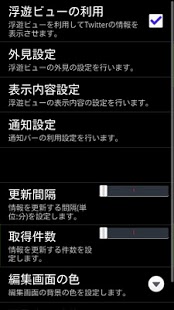
[Preference]
You can change
* Background color of non-read and read twitter
* Show of float view
* Size and color of float view frame
* Base position of horizontal and vertical
* Permit out of screen
* Show and size and color of name
* Line number and size and color of text
* Show and size and color of date
* Show ongoing bar area and icon
* Close notification
* Time and count of refresh
* Color of edit view
- It operates since Android1.6.
- It is a confirmed operation by N-04C,SH-12C.
About Float Timeline
The company that develops Float Timeline is PSC. The latest version released by its developer is 1.0.7. This app was rated by 1 users of our site and has an average rating of 3.0.
To install Float Timeline on your Android device, just click the green Continue To App button above to start the installation process. The app is listed on our website since 2012-01-10 and was downloaded 23 times. We have already checked if the download link is safe, however for your own protection we recommend that you scan the downloaded app with your antivirus. Your antivirus may detect the Float Timeline as malware as malware if the download link to com.psc.fukumoto.FloatTimeline is broken.
How to install Float Timeline on your Android device:
- Click on the Continue To App button on our website. This will redirect you to Google Play.
- Once the Float Timeline is shown in the Google Play listing of your Android device, you can start its download and installation. Tap on the Install button located below the search bar and to the right of the app icon.
- A pop-up window with the permissions required by Float Timeline will be shown. Click on Accept to continue the process.
- Float Timeline will be downloaded onto your device, displaying a progress. Once the download completes, the installation will start and you'll get a notification after the installation is finished.
Program Details
System requirements
Download information
Pricing
Version History
version 1.0.7
posted on 2012-01-10
Add permission 'RECEIVE_BOOT_COMPLETED'.,Change select color dialog.,Change icon.,Add 'Ignore RT' in preference 'Contents setting'.
version 1.0.7
posted on 2012-01-10
Several fixes and updates
